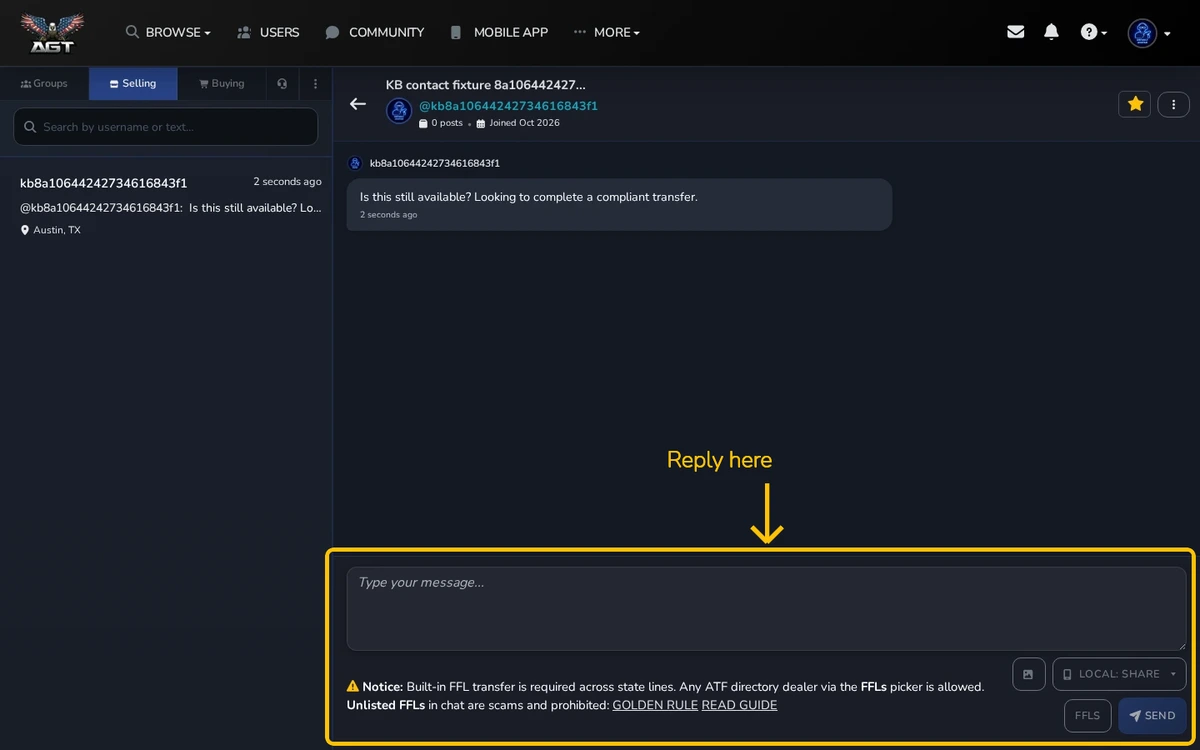
Your inbox is split into three tabs so it stays organized as you buy, sell, and chat with groups.
Quick overview
- Selling — messages from buyers about your listings
- Buying — messages on listings you contacted
- Groups — group conversations you have joined
Reading a conversation
Tap any conversation to open it. Unread ones are highlighted. Each message shows the time and the listing it relates to.

Replying
Type in the message box at the bottom and hit send. You can attach photos with the image button. Replies go through instantly and notify the other person by their chosen channel (email, push, or both).
Need to share a phone number or email? Do not type it in chat — it will be redacted. Use Share both beside Send (or the chevron menu for phone or email only) after you verify your number in Settings. See Sharing My Contact Details.
Search and filter
The search box at the top filters by listing title or member username. The filter button hides read conversations to focus on what is new.
Archiving
Swipe a conversation left on mobile, or use the menu on desktop, to archive it. Archived conversations are not deleted — they are just out of sight.



