Transcript
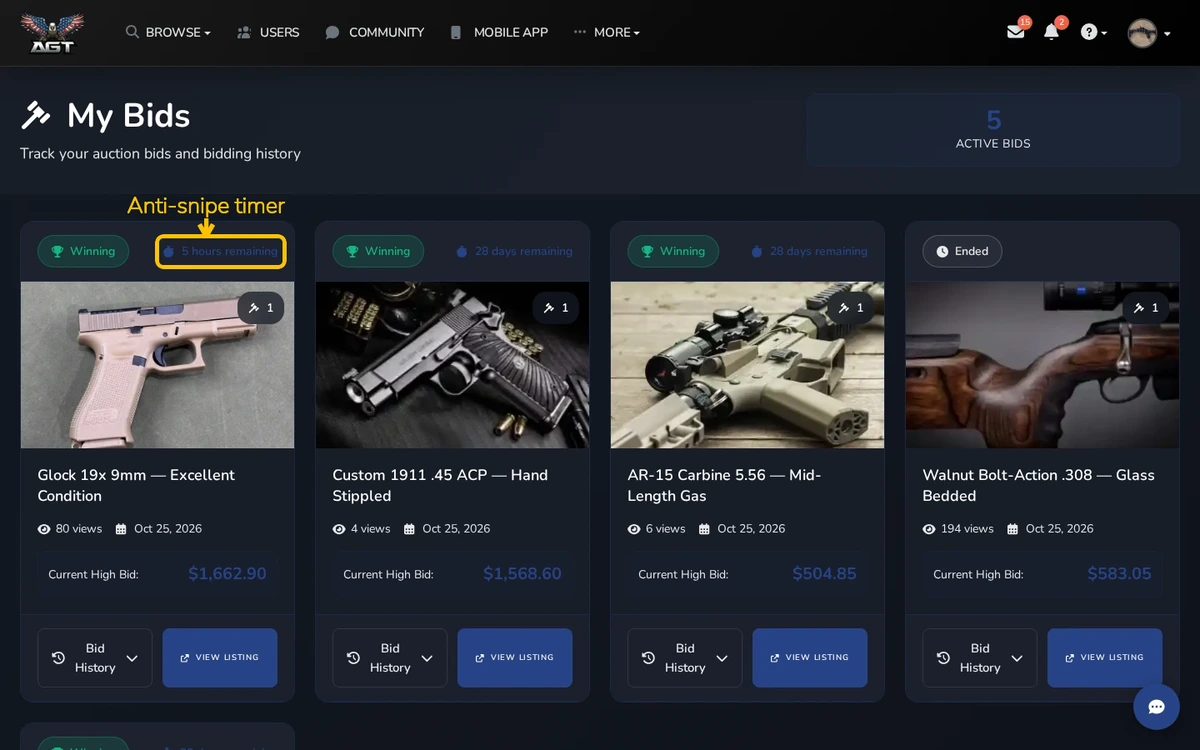
My Bids header: My Bids summarizes every auction you are watching or winning.

Quick bid stats: Header stats show active bids and recent wins at a glance.

Bid card: Each card shows the listing, your status, and the current high bid.

Bid status: The badge shows whether you are winning, outbid, or watching.

Auction timer: Watch the timer to know how much time remains before the auction closes.

Bid history: Open Bid History on a card to see every bid on that auction.

Return to the listing: Open the listing from the card when you are ready to bid again.

Browse auctions: Browse Listings when you want a fresh auction to watch or bid on.
Two features protect fair bidding: an anti-snipe extension on the auction clock, and max (proxy) bidding so you don't have to watch the clock at all.
Open My Bids to watch auctions you are in before the clock runs out. Header stats show active bids and recent wins at a glance. Each card shows the listing, your status, and the current high bid. The badge shows whether you are winning, outbid, or watching. Watch the timer to know how much time remains before the auction closes. Browse Listings when you want a fresh auction to watch or bid on.
Anti-snipe extension
If any bid lands within the final 5 minutes of an auction, the end time is pushed out to 5 minutes from that bid. This repeats every time a new bid lands inside that window, so a last-second bid can no longer win an auction outright — everyone gets a fair chance to respond.
Extensions are capped per auction so a listing cannot run forever. Once the cap is reached, further late bids no longer push the clock.
Max (proxy) bidding
Every bid you place is a maximum, not a fixed offer. Set the most you're willing to pay, and the platform automatically bids on your behalf — one increment (5%) at a time — only as much as needed to stay ahead of the next-highest bidder, up to your maximum.
- Other bidders never see your maximum, only the current standing bid.
- If someone else's maximum is higher than yours, they take the lead and you're notified so you can raise your maximum if you want to stay in.
- If your maximum is higher, you stay in the lead automatically — you do not have to keep coming back to re-bid.
Why this matters
Together, these two features mean sniping — waiting until the last second to place a winning bid — is no longer an effective strategy on American Gun Trader. Bid your real maximum whenever you're ready; you don't need to time it to the final seconds.