AGT Verified is an optional vendor badge for licensed dealers — not the same as choosing a dealer through built-in FFL transfer. Verified dealers are recommended first in the picker and unlock the full dealer stack: bulk FFL Tools, AGT Sync for WooCommerce, a dealer REST API with SDKs, an AI agent, and a badge buyers trust. See FFL Dealer Accounts for the full overview.
- Built-in FFL transfer
- Interstate dealer coordination through the in-chat FFLs picker — search, share a card, propose, and agree. This is the required path for out-of-state deals.
- Directory FFL (listed FFL)
- Any licensed dealer from the official ATF directory that you select through the built-in FFL transfer flow. Any directory dealer is allowed — you do not need an AGT Verified account to pick them.
- AGT Verified
- An optional trust badge for dealers with an active American Gun Trader vendor account. Verified shops are recommended first in the picker and can join the 3-way transfer chat after both parties agree. It is not required for a legitimate interstate transfer.
- Unlisted FFL
- A dealer identity shared outside the picker — typed license numbers, pasted shop names, photos of FFL paperwork, or “use my FFL” in plain chat. Prohibited and a common scam pattern. See Terms §3B.
Quick steps
- Open Settings → FFL
- Upload a photo or scan of your current FFL document
- Upload a government-issued ID
- Wait 1-3 business days for review
What you'll need
- Your current Federal Firearms License document (clear photo or scan)
- A government-issued photo ID matching the FFL holder's name
- Your business address (must match the FFL document)
Step 1: Upload your FFL document
Open Settings → FFL. Click Choose FFL or LOA document and pick a clear image of your full FFL document (or Letter of Authorization) — all four corners visible, all text readable.

Step 2: Upload a government ID
Upload a clear photo of your driver's license or passport. Names on your FFL and ID must match.
Step 3: Wait for review
Our team reviews most applications within 1-3 business days. You will get an email when a decision is made.
What you unlock
- Recommended first for local transfers. Every interstate sale needs a receiving FFL. When a buyer and seller in your state pick one in messages, verified dealers are listed above the rest of the ATF directory — even above shops that are closer to the seller. See Choosing an FFL.
- Auto-invited to the transfer chat. Once both parties agree on your shop, you are pulled into a private 3-way chat with them to coordinate.
- FFL Verified badge on your profile and listings
- FFL Tools — saved filter views, multi-select, and bulk price or status updates across large catalogs
- AGT Sync for WooCommerce — publish your store catalog and keep sold guns honest in both directions
- Dealer REST API, SDKs, and AI agent (MCP) — automate inventory from scripts, POS middleware, or Claude/Cursor
- Priority placement in the public dealer directory
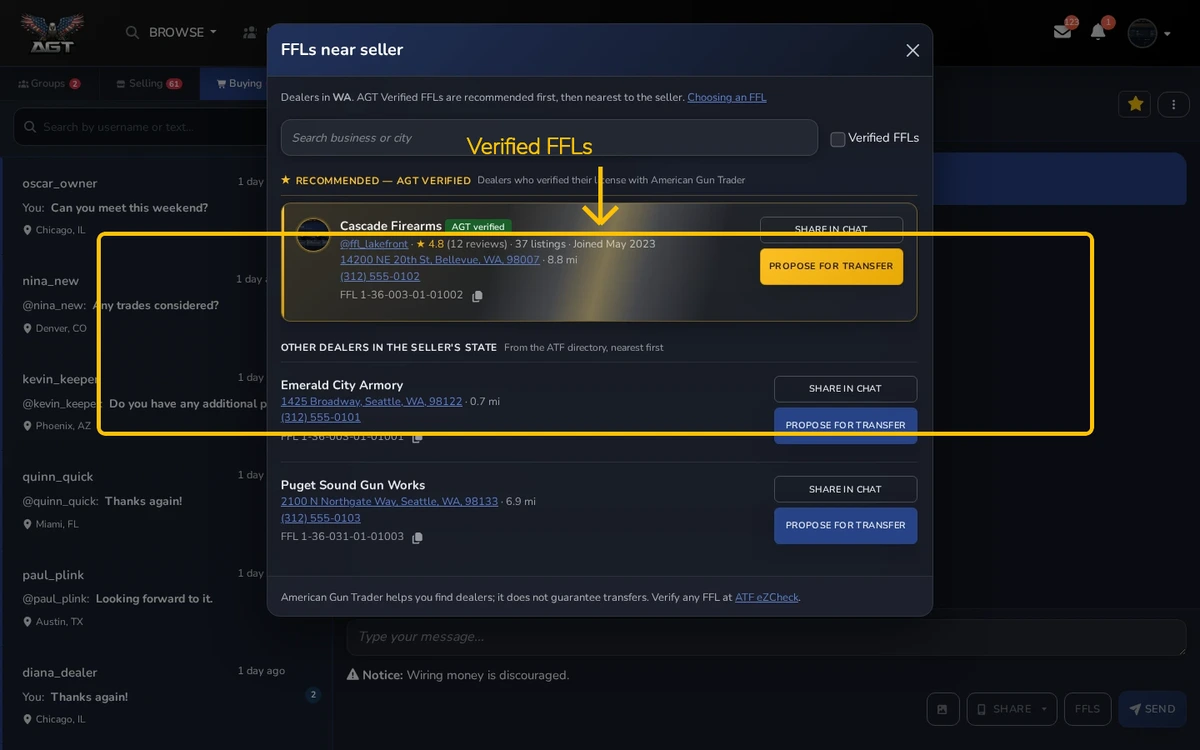
The promotion tracks your account: if your vendor subscription lapses or is revoked, you lose the badge and the top placement until it is restored.
Shipping and returns defaults
Once your vendor subscription is active, set default shipping states and a return policy on this page — new listings inherit them automatically, and you can still override either one on an individual listing when you post or edit it.
If your application is rejected
The email tells you why — usually a blurry document or a name mismatch. Fix the issue and re-apply; there is no cooldown.



